
In the rapidly evolving landscape of decentralized finance (DeFi), creating a user-friendly and highly functional platform is a formidable challenge. Wise Panda aimed to address this challenge by providing a comprehensive suite of tools for crypto trading. As the lead product designer, I led this project, which involved innovation, adaptation, and overcoming numerous hurdles to bring a visionary project to life.
Conceptualizing and Designing from Scratch
Wise Panda was a new platform with little precedent or prior experience in product design. My role was not just to design but to breathe life into the platform from the ground up. I relied heavily on the initial technical and stakeholder specifications, engaging in an iterative approval loop. This involved extensive research, analysis of the documentation and business needs, and the structuring of the platform, pages, interactions, links, and connections based on my findings.
This phase tested my ability to synthesize information, anticipate user needs, and translate complex technical requirements into intuitive designs. The excitement of contributing to the ever-evolving world of DeFi web3 kept me motivated, even as I navigated the complexities of this uncharted territory.
Challenges in Designing a Robust Platform
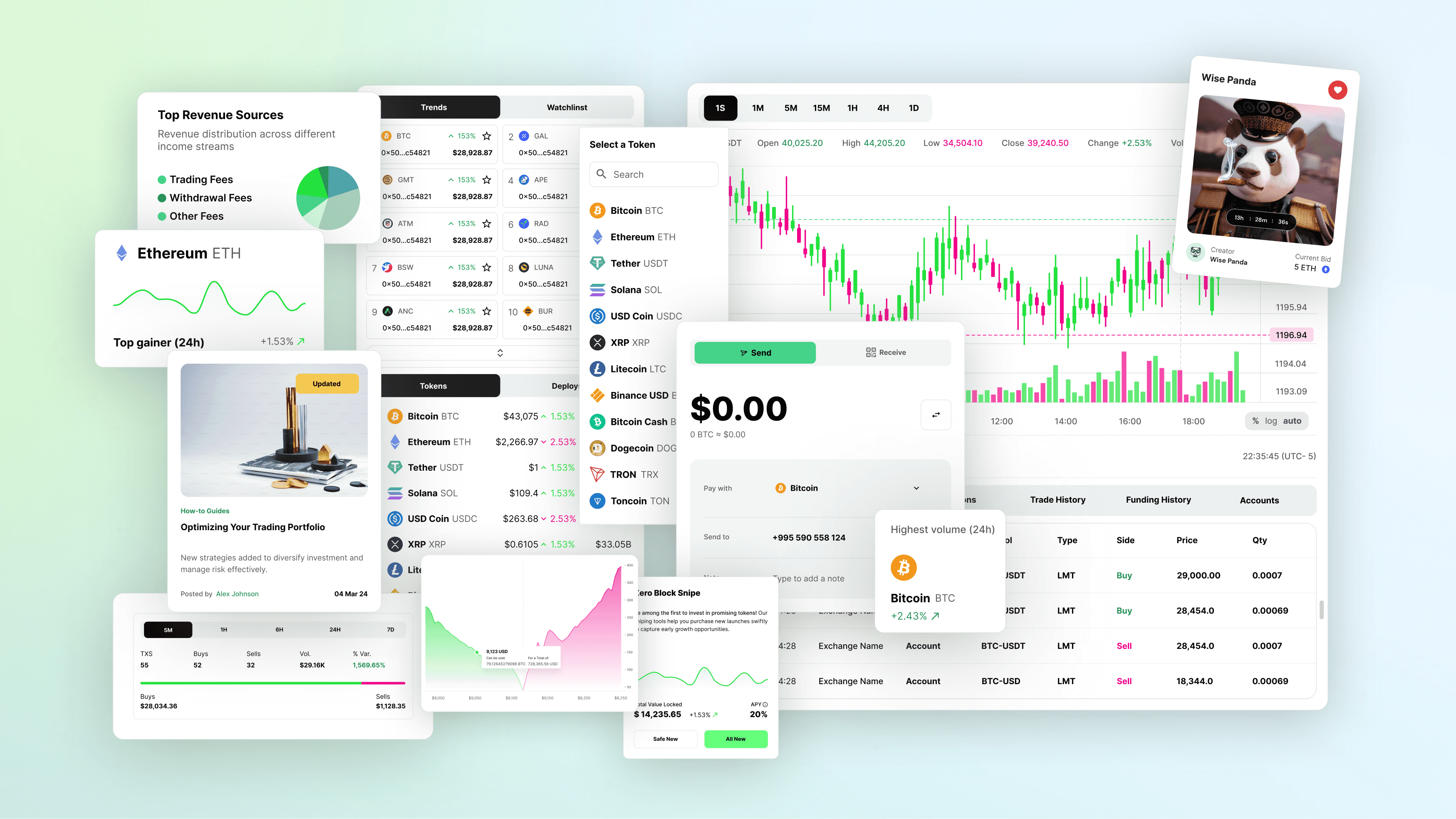
Creating a robust Defi platform like this one involved addressing multiple challenges. The platform needed to support a range of features, from sniper bots to NFTs and crypto trading, serving administrators and users. Every interaction and data point had to be meticulously designed to ensure a seamless experience for both users and administrators.
One of the most significant challenges was managing heavy data visualizations. The platform encompassed diverse aspects such as content management, user management, sales and revenue, registration, and even integration with Telegram bots. Designing these elements required a delicate balance between functionality and aesthetics, ensuring that users could navigate and interact with the platform without being overwhelmed by the sheer volume of information, while still appreciating its visual appeal.
Branding and Aesthetics
Beyond functionality, I also led the design of branding and aesthetics. The goal was to present a modern take on the platform's complexity by creating a visual identity that reflects the cutting-edge nature of DeFi.
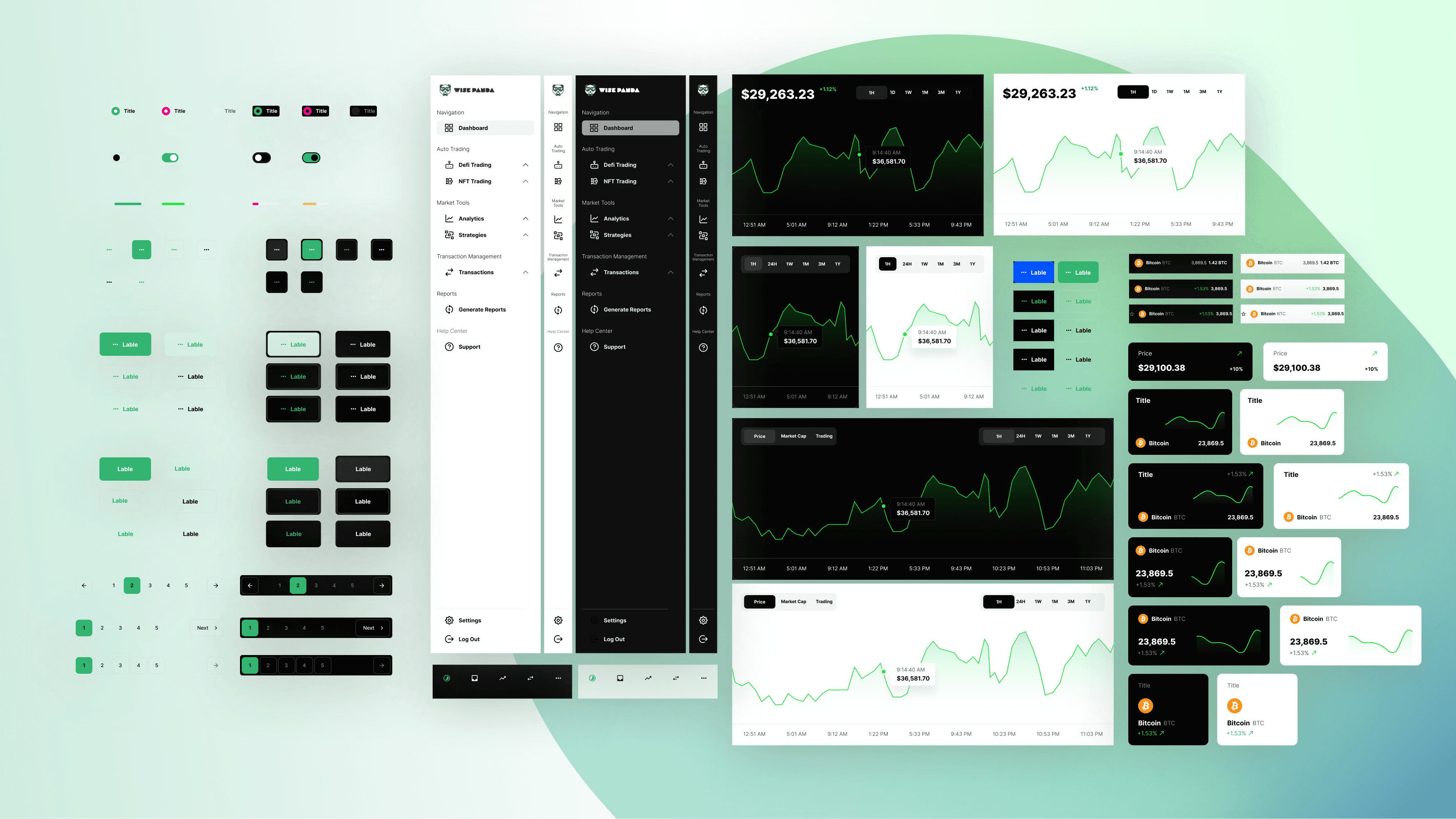
Building a Robust Design System
This design system needed to be flexible enough to accommodate future updates and expansions while maintaining consistency and coherence across the platform. The design system became the backbone of the user interface, ensuring that all components worked harmoniously.
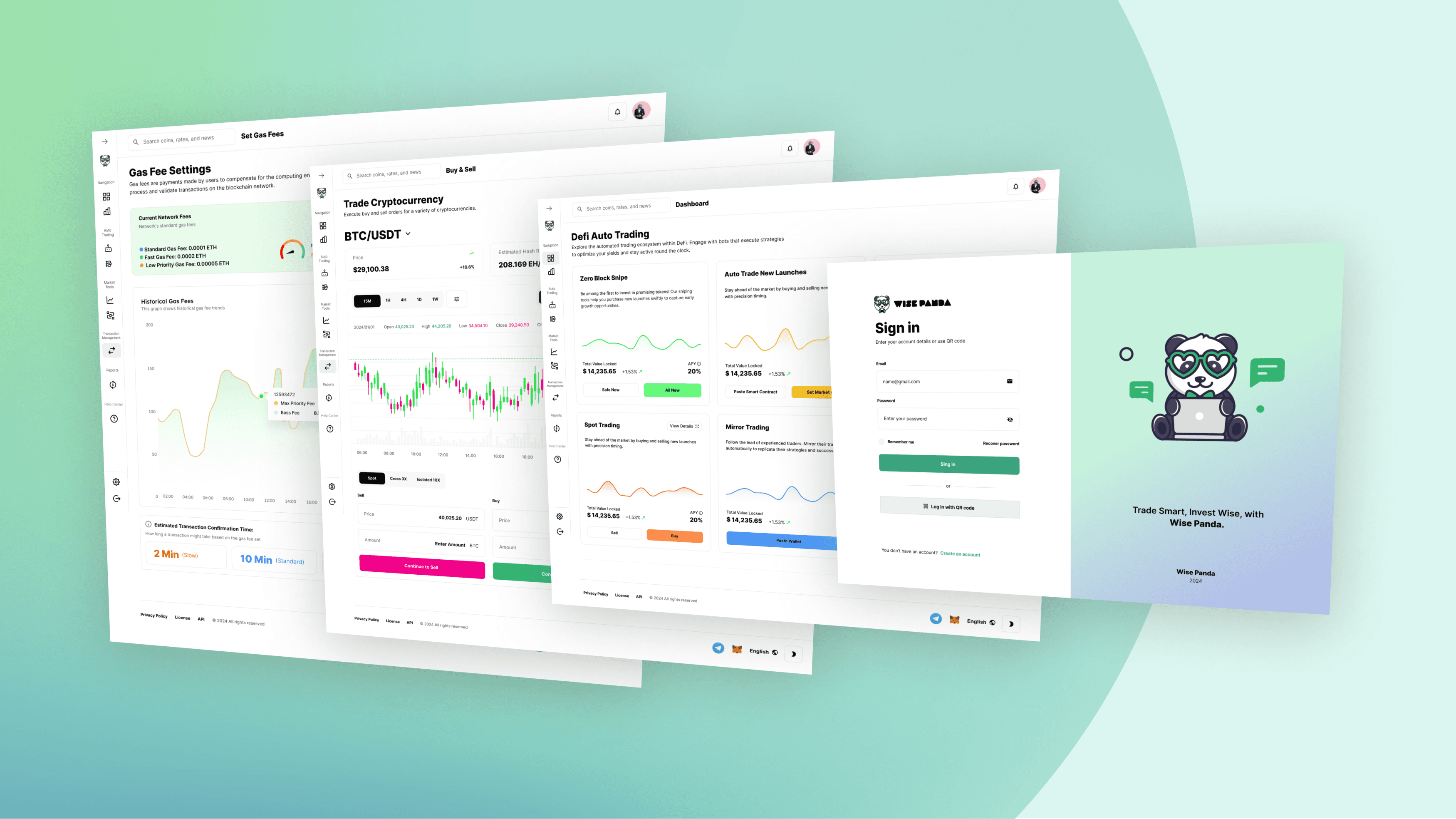
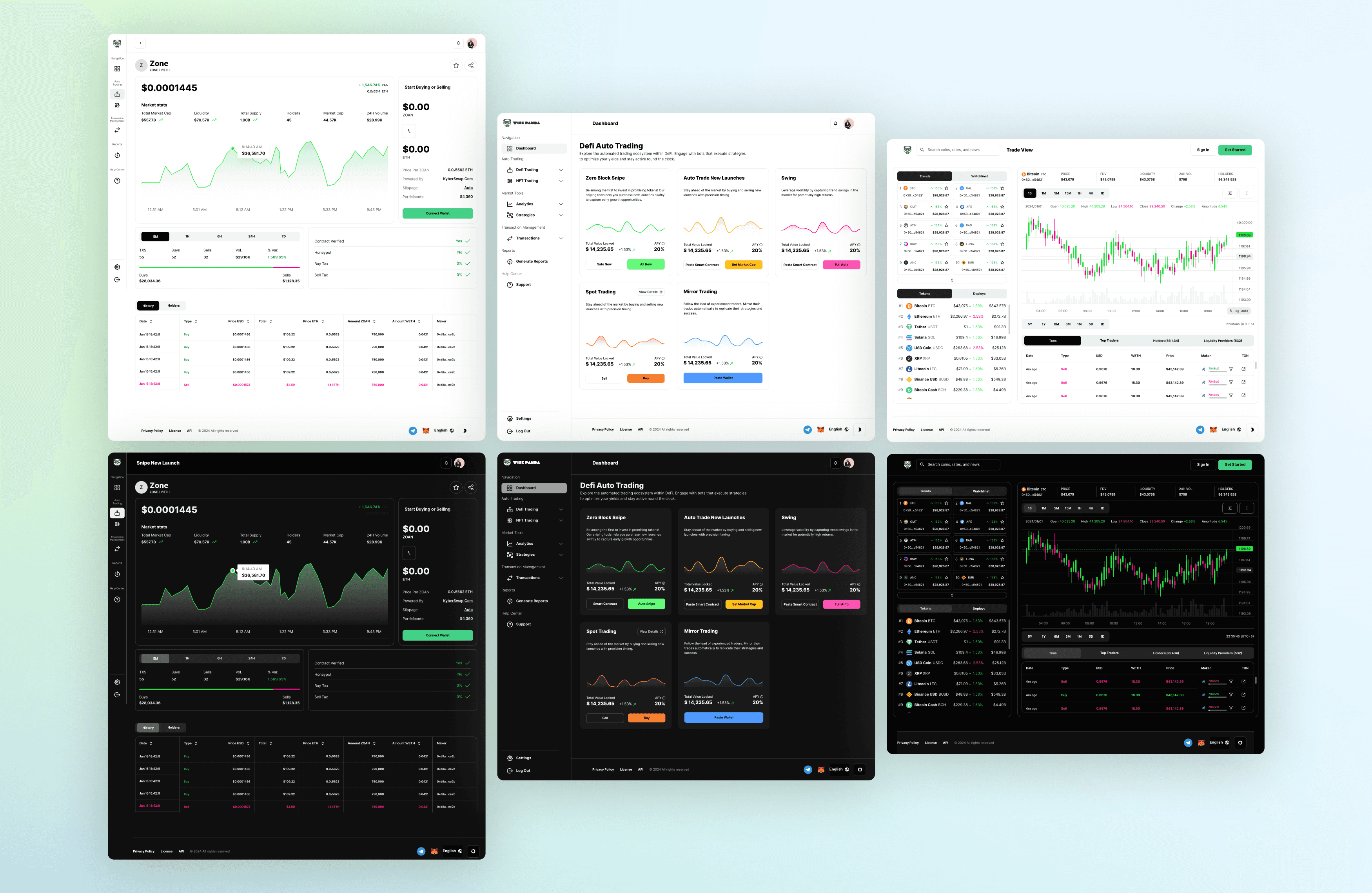
For the dashboard, I envisioned it as the command center, where users could get a streamlined overview of their portfolios, market trends, and essential trading tools. I focused on clarity and customization, allowing users to personalize their experience with interactive charts and widgets. I chose soft colors and straightforward typography to ensure vital information was always prominent, guiding users through their daily activities.
The Snipe New Launch and Trade View screens presented unique challenges and opportunities. I crafted a page highlighting real-time updates and critical metrics for the Snipe New Launch, enabling users to act swiftly on new token opportunities. The Trade View screen, designed for novice and experienced traders, combines real-time market data, comprehensive trading tools, and multi-asset support into a cohesive, user-friendly interface. By prioritizing speed, efficiency, and precision, I ensured that users could navigate complex trading environments with confidence and ease.
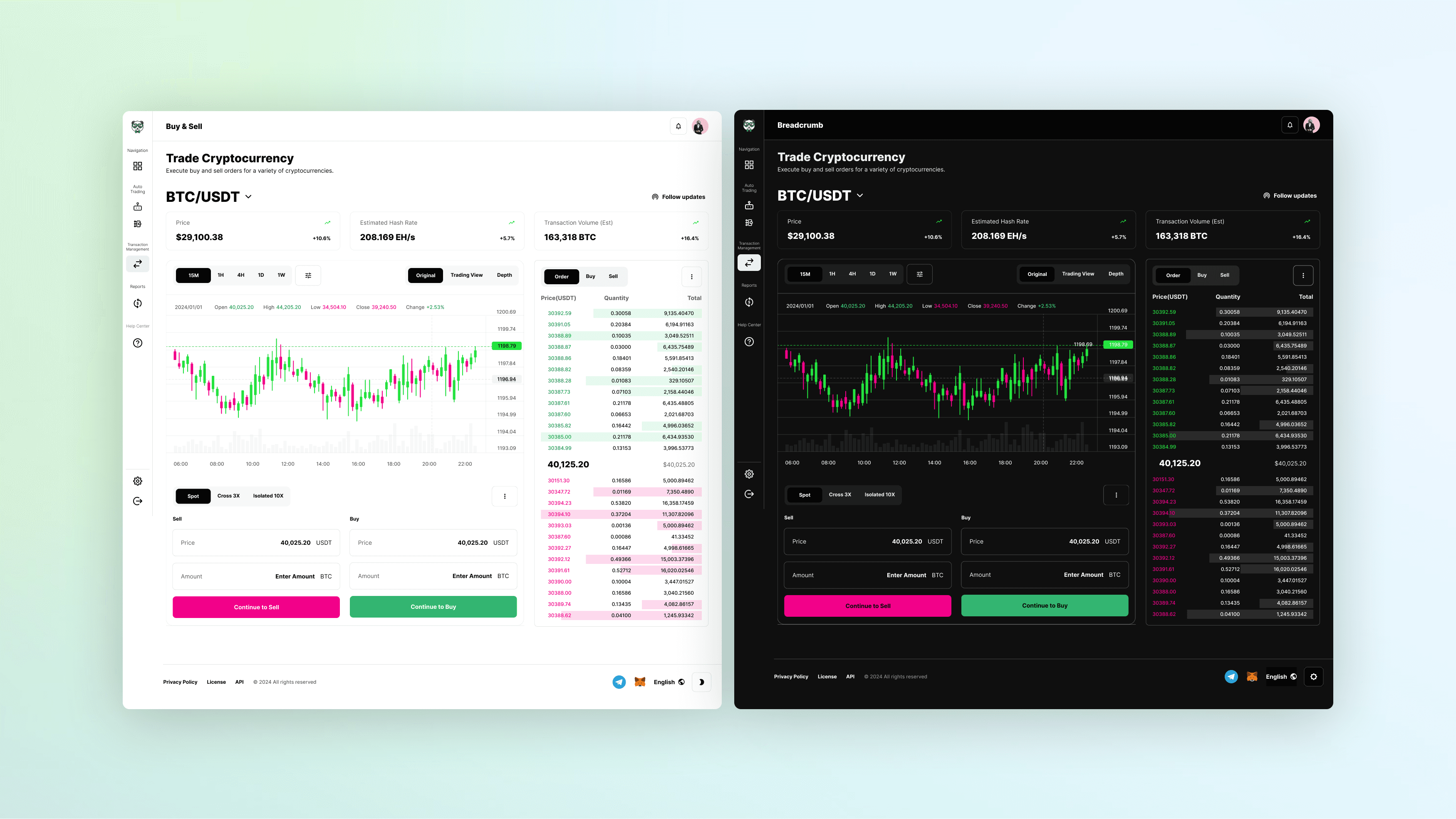
I focused on simplicity for the Buy & Sell module by prominently presenting critical information like price, transaction volume, and estimated hash rate. The interactive price chart enabled users to analyze market trends before executing trades, while the clean, minimalist design helped maintain focus on the trading action.
User Profile Settings
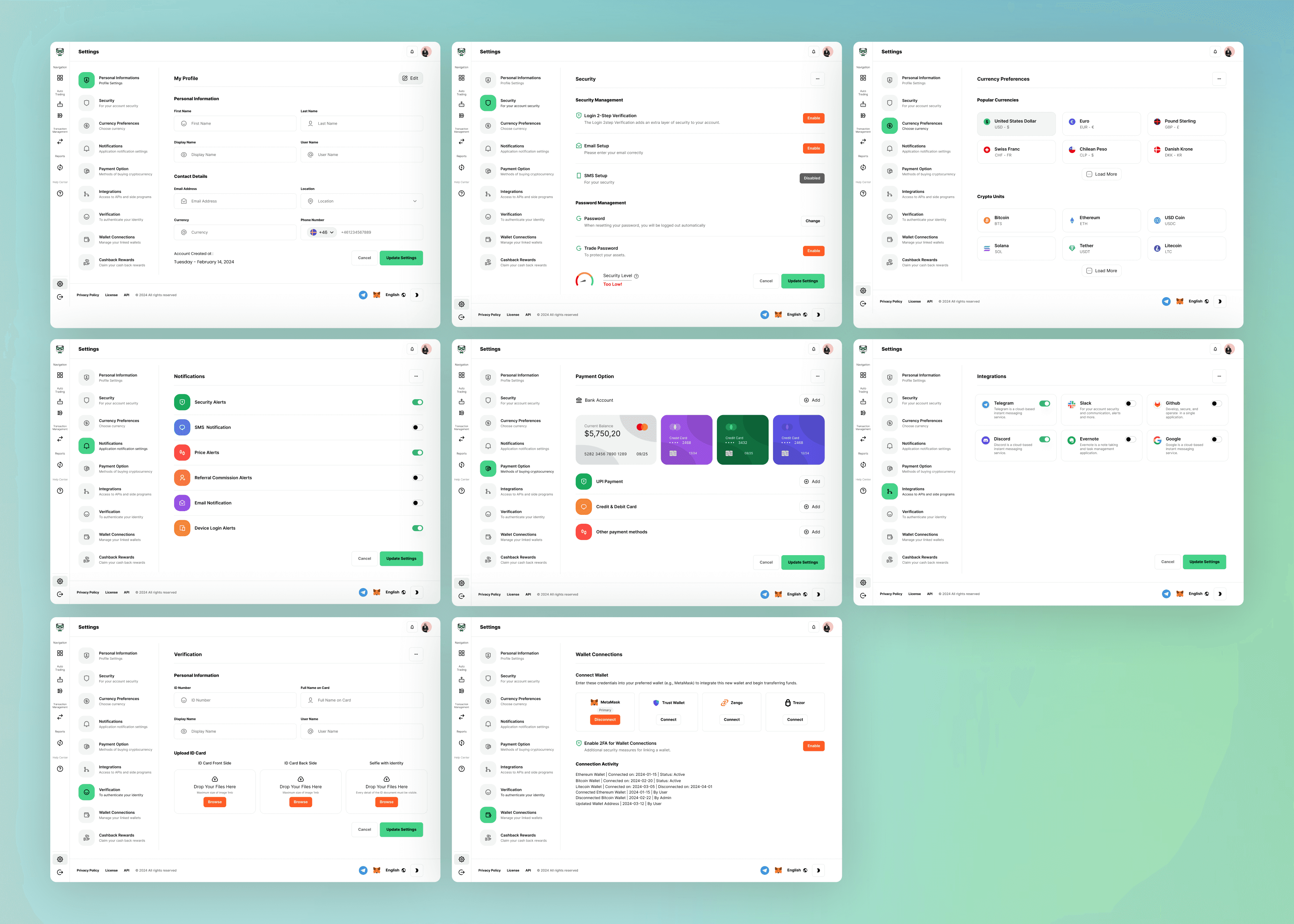
Designing the user profile setting pages required extensive research to understand users' specific needs and preferences on a DeFi platform. My goal was to create a comprehensive and intuitive settings interface that allows users to customize their experience and manage their accounts efficiently.
I identified the key elements users need to adjust, such as personal information, security settings, notification preferences, payment options, currency preferences, and integrations. Each setting must be easily accessible and straightforward to configure.
To achieve this, I structured the layout into clear, distinct sections. Each section is visually separated to prevent confusion and to allow users to focus on a single task at a time. The left-hand navigation panel provides quick access to all settings categories, while the main content area displays detailed options for each selected category. This structure ensures that users can navigate the settings without feeling overwhelmed by too many choices.
I also incorporated a mix of toggle switches, dropdown menus, and input fields, ensuring that each type of setting has an appropriate and user-friendly interface. The design emphasizes clarity and simplicity, with clean lines and ample spacing to prevent clutter. By focusing on usability and visual appeal, I created a settings page that empowers users to take complete control of their DeFi platform experience.
Admin Dashboard
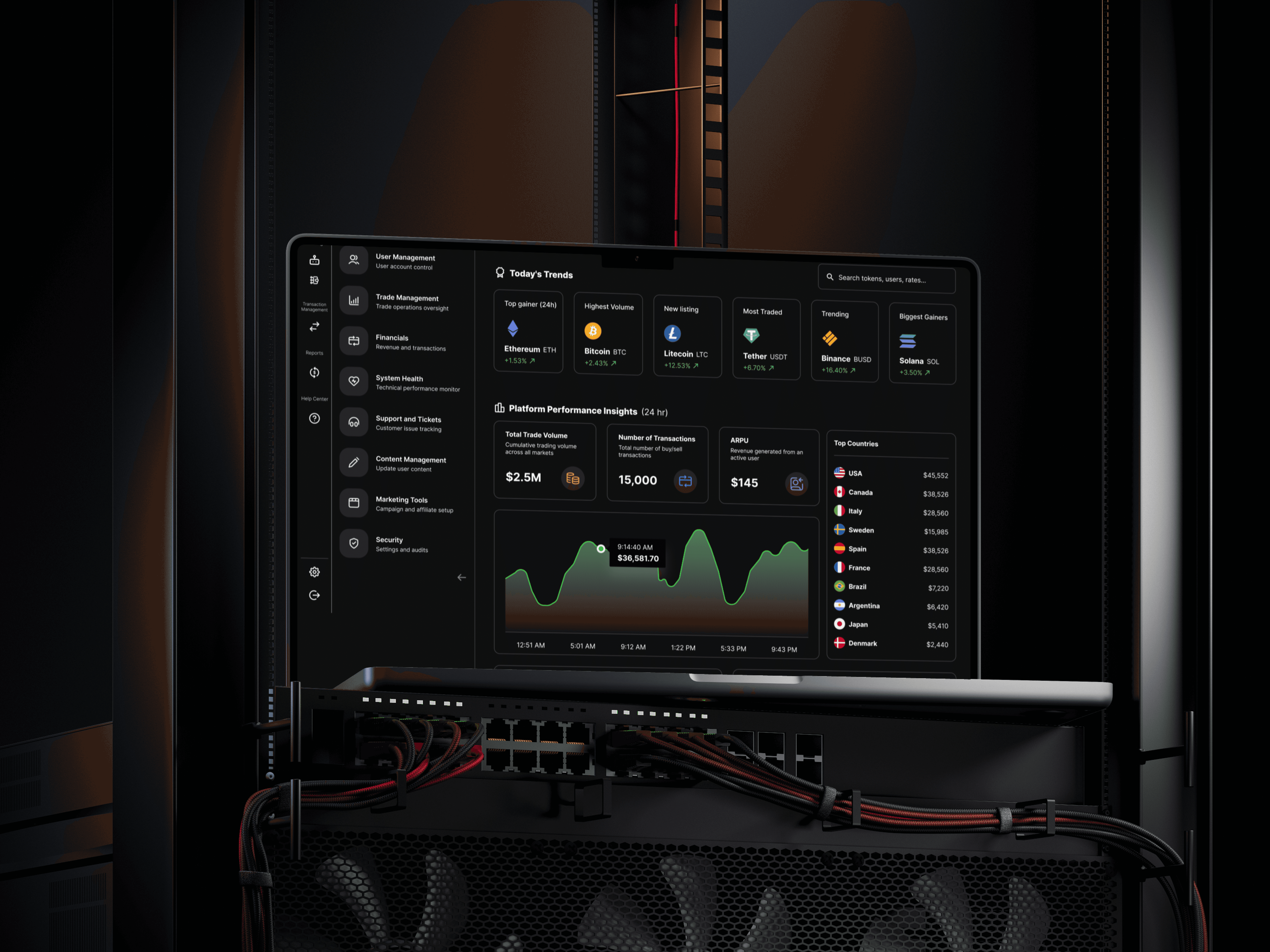
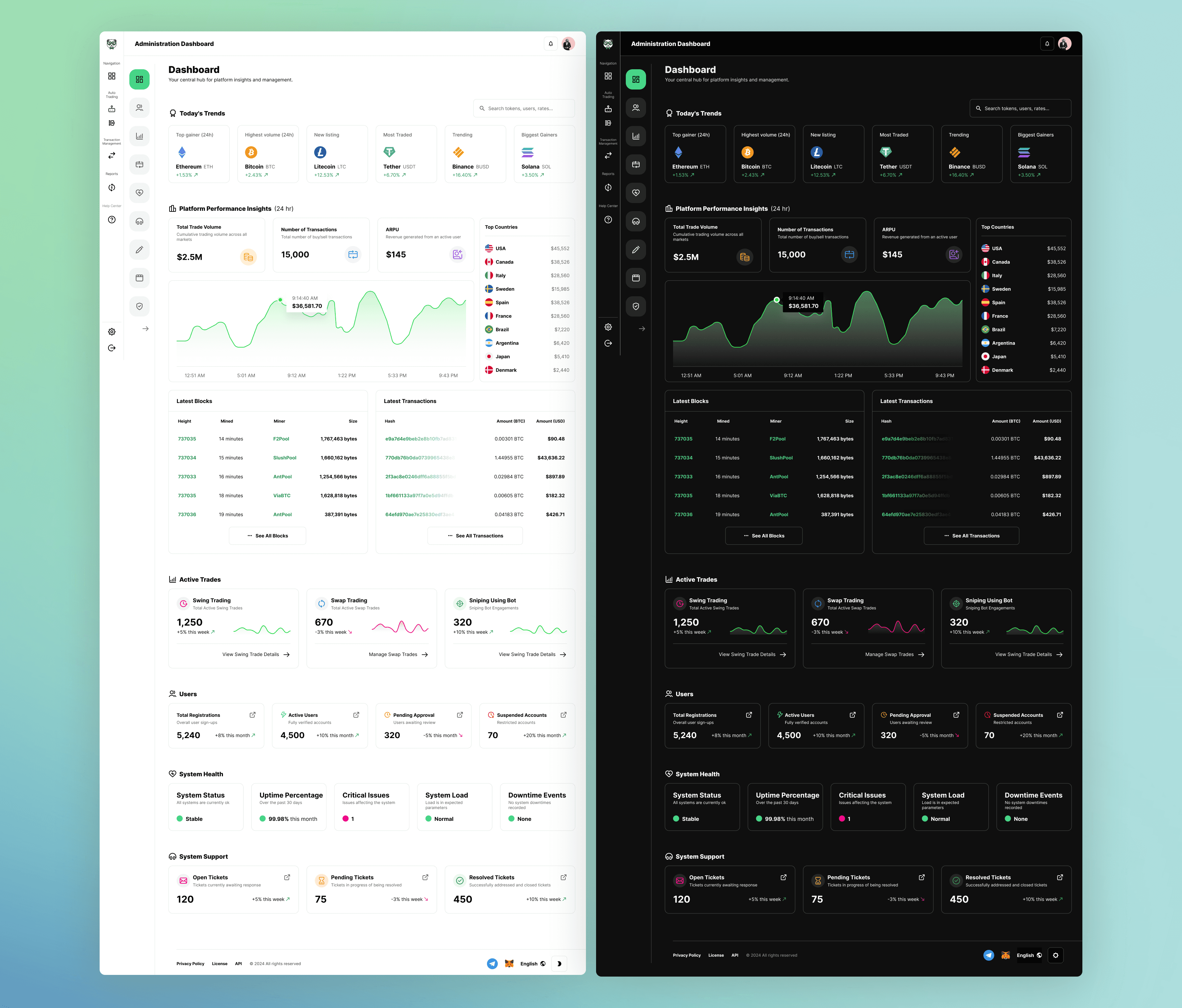
Designing the administrative dashboard was a critical component of the platform, ensuring that administrators could seamlessly switch between their user and administrator profiles to monitor and manage all activities. I designed the admin dashboard to be a powerful tool, providing a comprehensive overview of the platform's status and performance while maintaining an intuitive and user-friendly interface.
Administrators can easily toggle between their user and admin profiles, allowing them to experience the platform as regular users and then switch to manage and oversee activities. This flexibility is crucial for admins to understand user experiences and make informed decisions about platform improvements.
The admin dashboard has several key sections, each designed to provide critical insights and management capabilities. "Today's Trends" displays dynamic market data from a real-time API feed, ensuring admins have the latest information at their fingertips. This section helps admins stay on top of market movements and make timely decisions.
"Platform Performance Insights" visualizes essential metrics, including trade volume, transaction count, and ARPU, using data from internal analytics tools and financial databases. This comprehensive view helps admins monitor the platform's overall health and performance, identifying areas for improvement.
The "Active Trades" section provides a snapshot of swing, swap, and sniping trades, with trends and counts from the internal trading engine. It includes links to detailed trade management tools, allowing admins to dive deeper into trade analytics and management.
The "Users" section pulls counts and statuses from the user management database, providing insights into user activity and registration trends. This data is derived from sign-up logs and helps admins understand user growth and engagement.
The "System Health" section presents real-time indicators of system status, uptime, and load, derived from server health metrics. This section ensures that admins can quickly identify and address any technical issues.
Finally, the "System Support" section provides a comprehensive view of support ticket counts and statuses sourced from customer support software. Visualization tools help represent the distribution of tickets, allowing admins to manage support resources and address user concerns efficiently.
Financial & Trade Management
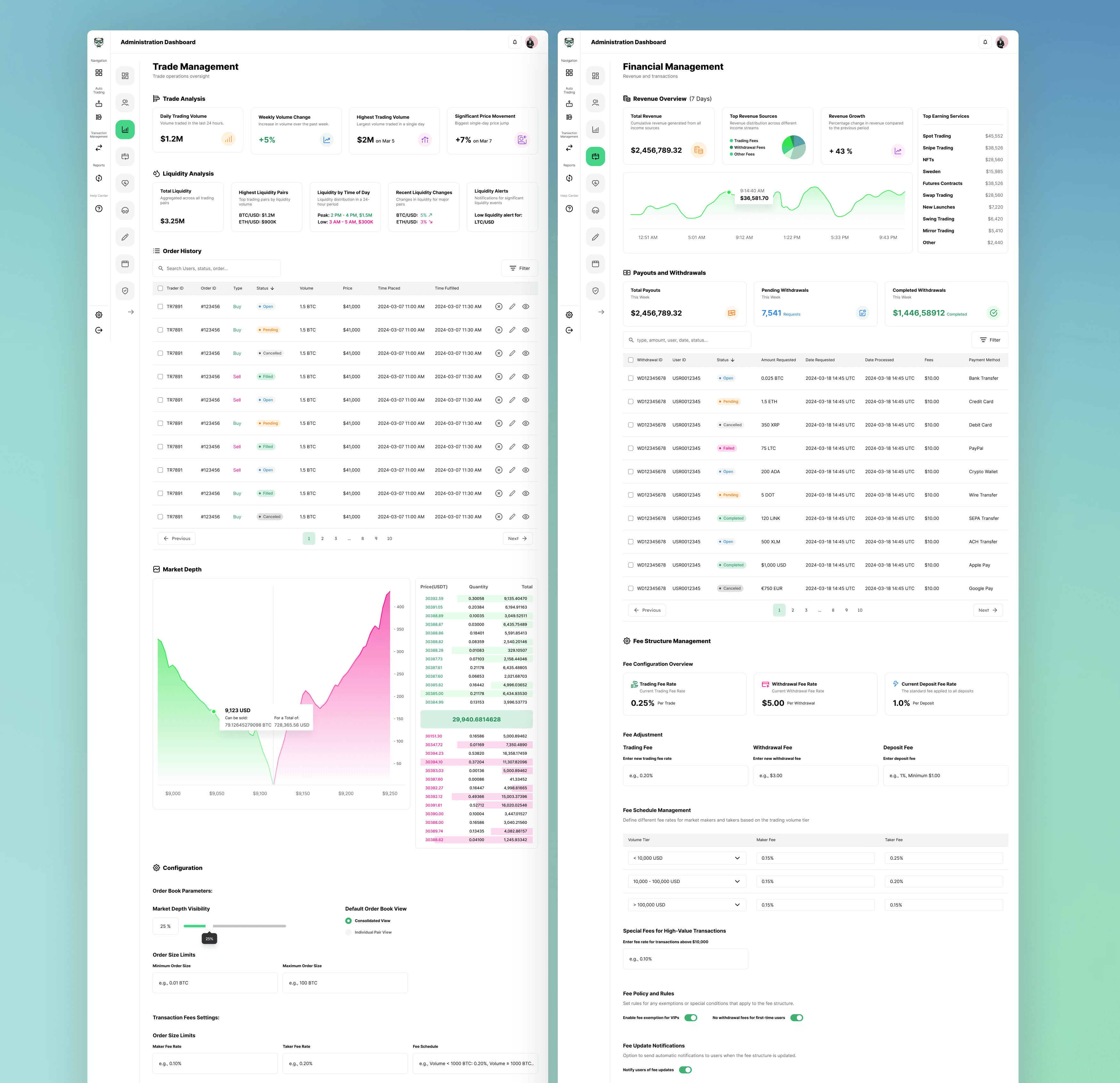
The admin module's Trade Management and Financial Management pages were designed to provide comprehensive oversight and control over the platform's trading and financial activities. These pages are essential for maintaining the platform's integrity and efficiency, ensuring administrators have the tools they need to manage complex operations seamlessly.
The Trade Management page is structured to offer detailed insights into trading activities, enabling administrators to monitor and analyze trades with precision. At the top, the Trade Analysis section displays key metrics, including weekly volume change, highest trading volume, and significant price movements. These metrics are crucial for identifying trends and making data-driven decisions.
Liquidity Analysis provides a snapshot of liquidity metrics, including changes in the liquidity pool and turnover rates. This section helps administrators monitor the platform's liquidity status, which is vital for maintaining a healthy trading environment.
Order History lists all recent trades, including trade ID, pair, price, quantity, and timestamp. This table allows admins to review and audit trades easily, with options to filter and search for specific transactions.
The Market Depth chart visualizes buy and sell orders, clearly showing market sentiment and order book status. This real-time visualization helps admins understand market dynamics and make informed decisions about liquidity management.
In the Configuration section, admins can set parameters for order book limits, transaction fees, and other trading settings. This flexibility ensures that the trading environment can be fine-tuned to meet the platform's needs and respond to market conditions.
Content Management
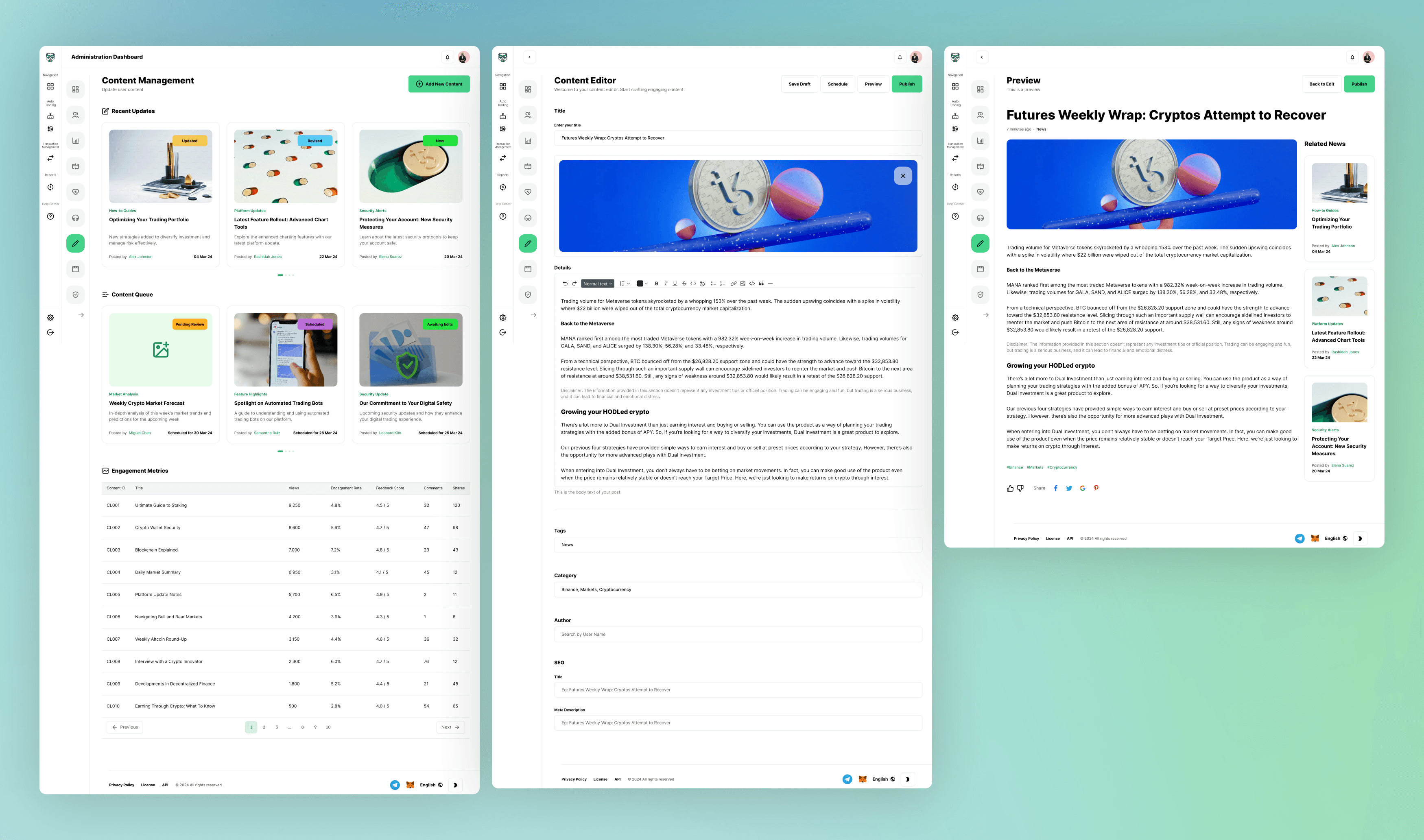
The content management module within the admin dashboard was designed to provide a seamless experience for administrators to write, edit, and publish new blog content on the platform. This module is crucial for keeping the platform's content fresh and engaging, enabling admins to manage everything from recent updates to detailed blog posts effortlessly.
The module is divided into several key sections: Recent Updates, Content Queue, and Engagement Metrics, each offering a distinct set of tools and insights.
In the Content Queue, admins can view and manage upcoming posts in various preparation stages. Each post in the queue is visually represented by a thumbnail and a status indicator, such as "Draft" or "Scheduled," helping administrators track the content pipeline. This section also includes quick actions for editing or publishing content directly from the queue.
The Content Editor offers a robust and intuitive interface for creating and editing posts. Admins can easily format text, insert images, and add links using a rich text editor. The editor also includes fields for metadata, such as tags and categories, ensuring that content is well-organized and optimized for search engines.
Before publishing, admins can see how a post will appear to users, ensuring the content looks perfect and functions correctly across all devices. This feature helps maintain a high standard of quality for all published content.
"The Engagement Metrics section provides valuable insights into how each piece of content performs. Metrics such as views, engagement rates, feedback scores, and comments are presented in a clear, accessible format. This data helps administrators understand which types of content resonate with their audience and informs future content strategies.
Telegram Bot Designs
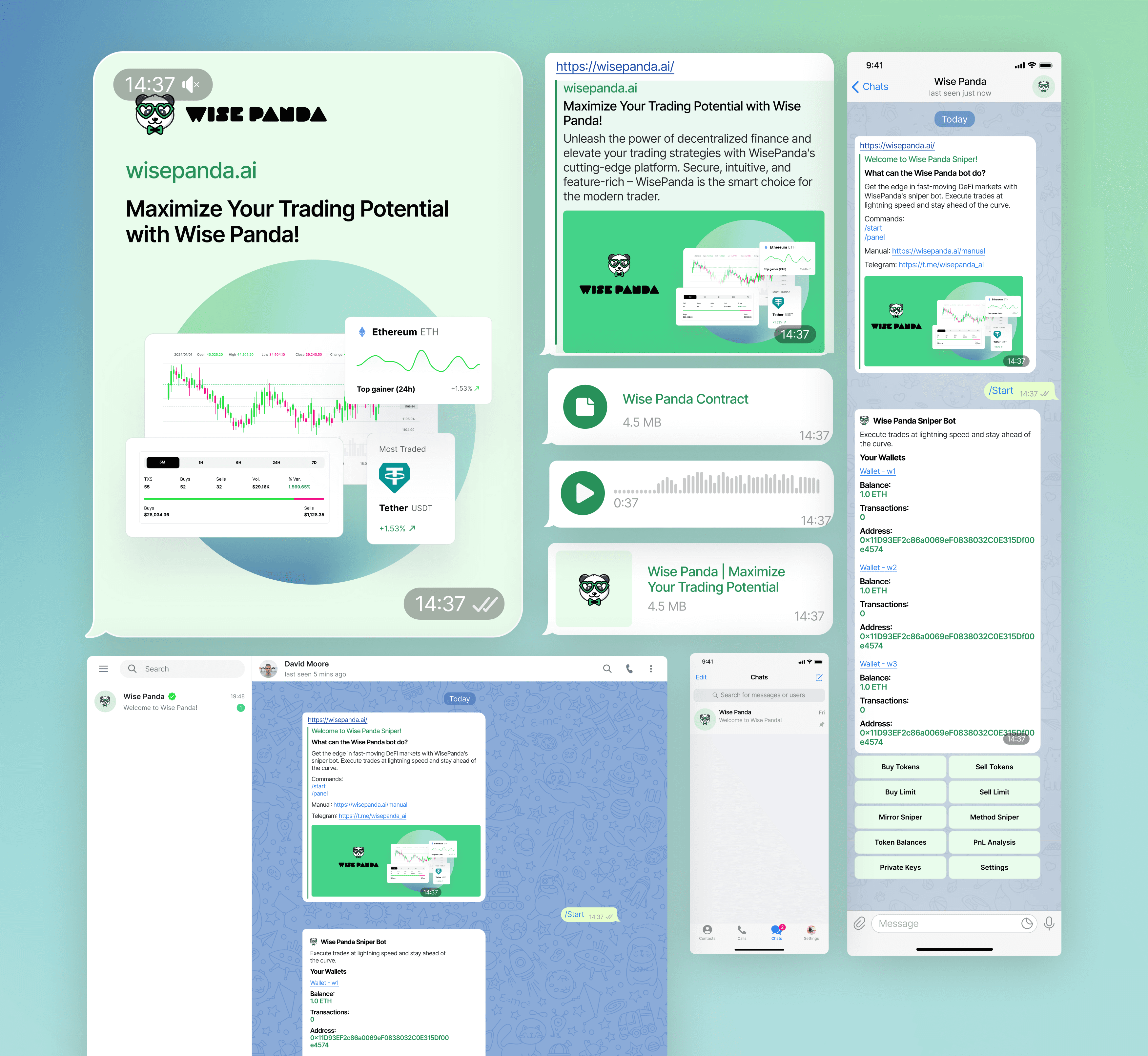
The Telegram bot provides users with a seamless experience in which they can execute trades, monitor their portfolios, and receive real-time updates directly within the Telegram app.
The design process began by understanding how users interact with chatbots and the specific features they require for trading. I aimed to create a bot that functioned as a natural platform extension, offering quick access to essential functions without switching between different applications.
The interface had to be intuitive and responsive, with clear commands and easy navigation. Users can view their wallets, review transactions, and execute trades via simple text commands or by tapping buttons. The design includes quick-action buttons for everyday tasks such as buying and selling tokens, setting limits, and accessing wallet balances, all streamlined to enable users to perform these actions swiftly and accurately.
One of the critical aspects of the design was ensuring real-time updates. Users receive instant notifications about market trends, price changes, and transaction statuses, allowing them to stay ahead of the curve. This feature is handy for sniping new token launches, where timing is crucial.
The visual design of the Telegram bot reflects the platform's branding, using familiar colors and iconography to create a cohesive experience. I ensured that the interface was clean and uncluttered, with a focus on usability. Each screen and message template was crafted to provide maximum clarity, helping users make informed decisions quickly.
Working on this project allowed me to thrive in a complex design environment where I transformed intricate, hard-to-understand content into simple, user-friendly tasks and screens. Whether it was creating a seamless admin dashboard, intuitive trading interfaces, or an efficient content management system, my goal was always to make powerful tools accessible to everyone. I take great pride in my ability to distill complexity into clarity, ensuring that users, from novices to experts, can easily navigate and use the platform.
Feel free to reach out if you're looking for a designer who excels in turning complexity into simplicity and can create intuitive, high-caliber designs for your project. I'd love to help you bring your vision to life with the same dedication and expertise. Contact me to discuss how we can create exceptional user experiences.